
What truly elevates this iteration, however, lies beyond appearance. The focus here is on user functionality rather than mere aesthetics. The Pixel Watch 4 is designed to assist users, providing more than just notifications and step tracking. Yes, AI is integrated, but this smartwatch brings a distinct experience, feeling more advanced than its predecessors or rivals. After spending a week with a review unit from Google, I’m ready to share my findings.
Extended Battery Life

Typically, I wouldn’t emphasize battery life early in a review, but in this case, it’s particularly important. Many smartwatches, up until recently, have struggled to last more than a day or so. The Pixel Watch 4, on the other hand, can comfortably last at least two days, eliminating worries about battery life during short trips or busy workdays without access to a charger.
In transitioning from their old charger to a new charging stand, Google has made some changes. While I don’t have strong feelings about the new design, I appreciate that it allows for faster charging via pogo pins on the side of the watch, even if they take some getting used to.
Performance Under Testing

During my testing period, I found that the Pixel Watch 4 required charging only twice over several days, once for the pictures and again before a trip. This indicates not just a claim but a genuine two-day battery life. Even when away from Wi-Fi, the battery drained only about 40% during outings.
My typical setup included the always-on display (AOD) and 4-6 complications, which do place demands on battery life. The dual-chip architecture found in this watch effectively balances power usage by delegating simpler tasks to a lower-power chip, while resource-intensive tasks are handled by a more powerful processor. This feature, which initially appeared in the OnePlus Watch 2, makes the watch competitive in battery efficiency.
Gemini Integration

The integration of Gemini into the Pixel Watch is a welcome addition. It not only enables typical tasks similar to what you perform on your phone but allows for added shortcuts through the Gemini Tile. For instance, I set up an easy alternative to control my bedroom light or query about events.
However, Magic Cue, which incorporates your personal data for timely responses—such as flight details—was absent from the watch. The feature which works effectively on smartphones doesn’t seem to push relevant information to the watch. This might seem like a simple implementation, but it’s intact in this generation.
Material 3 Expressive

The interface has received some subtle, yet effective enhancements under Material 3 Expressive. It presents a design that almost sways me to keep the app grid view over the list view. Applications are displayed in three columns, retaining only icons. Although this might be mildly frustrating, the aesthetic makes it more bearable.
In addition, Material 3 Expressive provides several buttons in creative layouts for easier access to multiple controls at once, notably in the Maps tile, which offers features like quick searches, instant directions, and businesses nearby—all visually adapted to fit the round display seamlessly and in an engaging way.
Step Tracking and Exercise

Sleep and exercise tracking remain consistently reliable, with the addition of using your phone as a cycling dashboard through the watch. Simply start a cycling session on the watch, and your phone will prompt you for the dashboard integration. While not a unique feature, the partnership between the phone and the watch is commendable.
However, I had mixed results with automatic activity detection. While walking around New York City, I received no prompts to track my exercise. The FitBit app didn’t log my activity, although the Google Fit app did. This inconsistency raises questions, and I plan to follow up with Google for clarification.
Refined Display Features

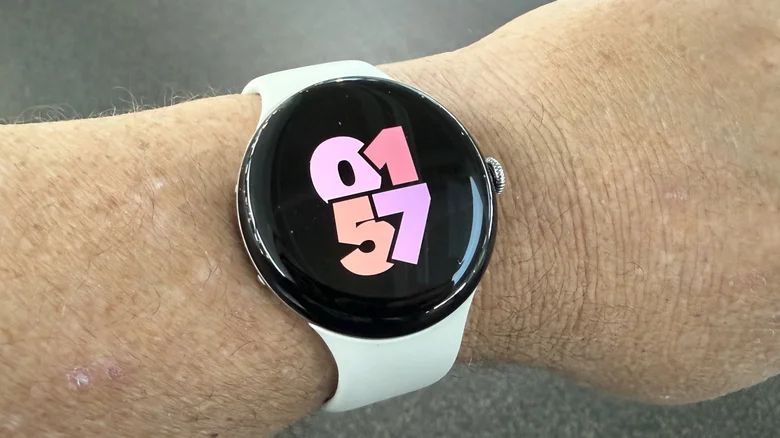
The display deserves special mention, as the Pixel Watch 4 introduces a design featuring a fully domed glass surface. Unlike its predecessor, the watch face and corresponding glass both curve, creating a more modern aesthetic. Comparing it with the Pixel Watch 3 side by side reveals a significant change, offering enhanced edge-to-edge appearance.
This small alteration delivers a polished finish to the overall design, resulting in a greater sense of sophistication and attention to detail.
Satellite Connectivity Capabilities

Another feature added is satellite connectivity, creating a safety net in off-the-grid situations. I chose to highlight it towards the end since I have not been in areas that would test this functionality. My past experiences suggest it works adequately but can be complex to utilize effectively.
In conclusion, it’s reassuring to know this feature exists, offering peace of mind in emergencies, and I plan to provide updates on its performance when I’m able to test it thoroughly.
Pricing, Availability, and Overall Impression

The Pixel Watch 4 is now available for purchase through the Google Store, priced at $349.99—consistent with the launch price of the Pixel Watch 3. However, the older model is currently retailing at $249.99, complicating the purchasing decision.
Overall, the Pixel Watch 4 stands out as my preferred WearOS device thus far. The refinements made in this generation enhance my previous concerns, presenting an attractive package when paired with the Pixel 10 Pro Fold—another impressive device in terms of battery performance. Whether it’s worth the investment, especially for those already using the Pixel Watch 3, is subjective. If you’re currently using the older model, the upgrades may not be compelling enough to warrant a new purchase. However, for newcomers, the extra features could justify the cost difference, as the Pixel Watch 3 remains an excellent value at its reduced price. I’m curious to see what Google’s next iteration might bring since this one feels polished already.