Amazon is primarily recognized as a leading online marketplace, but it also offers a diverse range of hardware. Among these devices, the Fire TV Stick stands out as one of the company’s most popular products. This little gadget connects to the HDMI port of your television, transforming it into a smart TV with immediate access to various streaming services, including Netflix, Disney+, and Apple TV.
Over time, Fire OS has evolved, now supporting a wider array of applications while incorporating enhanced functionalities. Users can now control smart home devices via their Fire TV Stick, or indulge in cloud gaming through platforms like Amazon Luna or Nvidia’s GeForce Now. The included remote control is sufficient for managing your Fire TV device, and the integration of Alexa voice commands offers added convenience.
Additionally, the Fire TV app available for both Android and iOS devices provides users the ability to manage playback or activate Alexa, especially useful if the remote is misplaced or for easier text input. Although the app has existed for some time, it recently underwent a significant redesign that improves both its usability and design. Now, the Fire TV app serves as a comprehensive companion to your Fire TV device, beyond merely acting as a remote.
Recent Updates to the Fire TV App
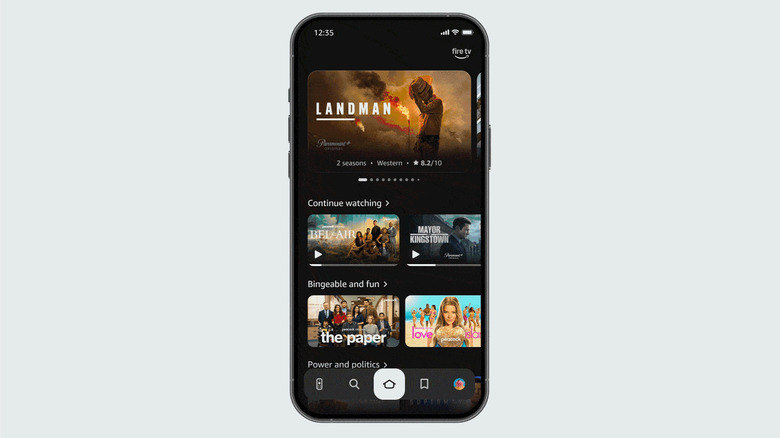
Amazon has recently revamped its Fire TV interface, bringing a fresh design along with new features, including enhancements for Alexa functionality on Fire TV. This overhaul includes an updated version of the Fire TV companion app for mobile devices, which now mirrors the aesthetics of the television interface. You can still utilize the app to manage your Fire TV device as usual, but it now also functions as a watchlist organizer, enabling users to explore new content and stream it directly to their TV.
The company highlights that the Fire TV app is designed to function as a secondary screen during your TV viewing experience. Instead of interrupting what you are currently watching to search for new content, you can queue up your next selection using the Fire TV app on your mobile device. This makes it easier to augment your watchlist with movie and show recommendations from friends and family, allowing you to refine your selection away from home.
If you’re unable to locate the new features, ensure that you have updated the app to its latest version. You can do this by checking for updates in the Google Play Store for Android devices or the App Store on an iPhone. Remember to use the same Amazon account linked to your Fire TV when signing in.